
High performers seek out productivity hacks, desire more efficient workflows, and are more likely to ruthlessly evaluate anything that takes up their time without a clear reason. Productivity is largely a habit, skills, and solid planning. Workspace is not the only key factor, but it is still important.
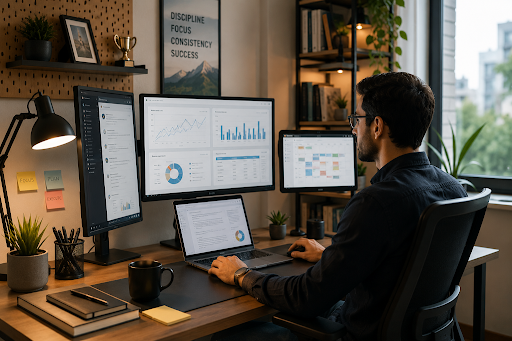
One piece of workspace that many high performers upgrade is a multi-screen setup. Software developers, designers, financial analysts, marketers, and remote workers use multiple displays to see more information, keep things in view and avoid repetitive switching between windows.
A dual-screen setup can be two desktop monitors or a laptop and a second screen. A portable monitor is an excellent way to turn a laptop into a two-screen workstation, adding valuable real estate for any professional who needs to work from multiple locations or in different settings.
What Is a Multi-Screen Setup?
A multi-screen setup refers to any digital workspace that uses more than one display. Instead of opening and closing browser tabs or windows, users place important items on a second, third, or even fourth screen.
A professional might use a three-screen setup like this:
- One screen for the primary task
- One screen for research, communication, or reference material
- One screen for dashboards, previews, or monitoring tools
UPERFECT and other brands are also making it easy for high-performing professionals to move with full, multi-screen workspaces, moving beyond the limitations of a single laptop or a permanent monitor setup.
Why Do High Performers Use Multiple Screens?
The benefit of a multi-screen setup is not just additional screen space. It is having the right information at the right time.
1. It Saves Time
Scrolling through browser tabs, word processor windows, messaging apps, spreadsheets, cloud applications, and other digital windows is a common task for many high-performing professionals. Opening new browser tabs can become habit-forming in its own way.
Having more than one screen makes it possible to keep these commonly used tools in view at all times.
A writer can draft content on one screen and have research open on the other. A developer might write code on one screen and view documentation or testing results on another. A marketer may keep campaign tools on the main display while using a secondary monitor for dashboards and analytics.
With multiple screens, the user does not have to constantly minimize and reopen windows.
2. Provides Greater Visibility
Certain jobs naturally involve many open windows and applications at once. Financial professionals may need to see charts, spreadsheets, and news sources. Marketers might use a mix of dashboards and tools. Designers often keep reference images, editing software, and project information open simultaneously.
More than one screen provides all these complex tasks with more room.
| Professional | Primary Screen | Secondary Screen | Key Benefit |
| Developer | Code editor | Documentation/testing | Faster reference access |
| Designer | Design software | Assets and references | Better visual workflow |
| Marketer | Campaign tools | Analytics/dashboard | Easier performance monitoring |
| Writer | Writing document | Research sources | Fewer interruptions |
| Remote worker | Main task | Email/video calls | Better task separation |
The “perfect” setup depends on the nature of the job and professional workflow. Using more than one screen is most helpful when each monitor has a specific purpose.
Multi-Screen Workspaces Can Make Deep Work Easier
Deep work requires concentration. Every unnecessary interruption makes it harder to keep focused.
A properly organized multi-screen workspace can help with these interruptions by dedicating a specific role to each screen. Instead of searching through overlapping windows, the user knows where to find information.
For example:
- Main screen for focused work
- Secondary screen for reference materials
- Optional third screen for communication or monitoring
However, more screens are not automatically better. If each screen is filled with notifications, social media, and unnecessary information, more real estate does not create focus. High performers use multi-screen setups because they know how to organize the additional space.
Remote and Portable Multi-Screen Work Is Becoming Common
Traditional dual or triple monitor setups work well for permanent office spaces. Increasingly, professionals of all types work from multiple locations and environments.
Portable monitor have become small, easy to attach, and provide more screen space to a laptop. This kind of setup can be great for remote workers, business travelers, students, creators, and digital nomads.
Instead of having to adapt an entire work process to a single small laptop display, users can bring an additional screen when needed to create more workspace.
| Setup | Portability | Screen Space | Best For |
| Laptop only | Excellent | Limited | Simple tasks and travel |
| Laptop + portable display | High | Expanded | Hybrid and remote work |
| Dual desktop monitors | Low | Large | Permanent workstations |
| Three-screen setup | Low to moderate | Very large | Complex professional workflows |
Working Outdoors? You’ll Need a Different Kind of Display
High performers may not always work in traditional offices. Photographers, field professionals, remote workers, and outdoor creators often need to work in bright conditions.
Traditional displays are more difficult to see in strong ambient light. A sunlight monitor designed for better outdoor viewing can be much more practical in these situations.
Brightness, reflections, display positioning, and surrounding light all factor into screen visibility when working outdoors. Photographers, remote workers, and other field professionals should consider these elements when choosing a monitor rather than focusing on resolution or screen size alone.
Will a Multi-Screen Setup Help Productivity?
In the right workflow, a multi-screen setup can help increase productivity when the work naturally involves frequent comparison, referencing, monitoring, or multitasking.
The benefits of a multi-screen setup are typically felt most when a person needs to:
- Compare or contrast documents or datasets
- Research and write at the same time
- Monitor dashboards while completing other tasks
- Communicate with others while keeping their main workspace available
- Preview creative work while editing or working in a single program
- Use more than one professional application simultaneously
On the other hand, highly focused tasks that use only one application might be best on a single large screen. The “best” setup is whatever removes friction for the user instead of adding complexity.
Designing a Useful Multi-Screen Workspace
A truly productive multi-screen setup is built around an individual workflow rather than a certain number of screens.
The user should place their primary display directly in front of them and use secondary screens for reference or supporting information. It can also help to keep frequently used applications in consistent positions, creating an intuitive layout that allows the user to find information without searching.
Screen height, viewing distance, brightness, and desk space also factor in. If a second or third monitor forces poor posture or makes the desk visually cluttered, the setup may not improve productivity.
Mobile professionals should also consider lightweight displays and simple, flexible connectivity when choosing a multi-screen setup that is easy to move and use in different locations.
The Future of High-Performance Workspaces
Work is more flexible than ever, but professional tasks are also more digitally complex than ever. Communication, cloud apps, analytics and reporting tools, creative software, and AI-powered systems are commonly mixed into a single workflow.
Multi-screen setups help professionals manage the complexity by giving each task dedicated space. The future of productivity is not likely to be using as many screens as possible. Instead, it is about creating a workspace that makes it easier to find information and reduces unnecessary digital friction.
Frequently Asked Questions
Why do professionals use multiple monitors?
Professionals use multiple monitors to keep multiple applications or sources of information visible at all times. This can help reduce repetitive switching and make complex workflows easier to navigate.
Is a multi-screen setup better than a single large monitor?
It depends on the workflow. Multiple screens have clear separation between workspaces. A single large monitor is one big workspace. Both can be productive when arranged optimally.
Is a portable monitor useful for work?
Yes. A portable monitor can give additional screen space for professionals who work from multiple locations and cannot set up a permanent desk.
How many screens are best for productivity?
For most professionals, two screens strike a useful balance between additional workspace and simplicity. Additional displays are most useful for specialized workflows that require keeping many different applications in view.
Can multiple screens be distracting?
Yes. Additional screens can become distractions if the user leaves notifications, social media, and other unrelated content visible. Assigning specific purposes to each screen can help users stay focused.
Conclusion
High performers use multi-screen setups because modern work often requires seeing multiple tools and sources of information at once. A well-organized multi-screen workspace can eliminate repetitive tasks and distractions, improve visibility, and allow smoother workflows.
Workspaces range from a permanent office setup to a laptop with an additional display. The “best” configuration for each person depends on where and how they work. The most effective setup is not necessarily the one with the most screens. It is the one that helps the user stay focused and complete tasks with less friction.